Singularity
Focus:
Reproducibility in scientific and high-performance computing (HPC) world.
Origin: Lawrence Berkeley National Laboratory. Later spin-off: Sylabs
Version 1.0 (2016)
More information: https://en.wikipedia.org/wiki/Apptainer
Singularity architecture
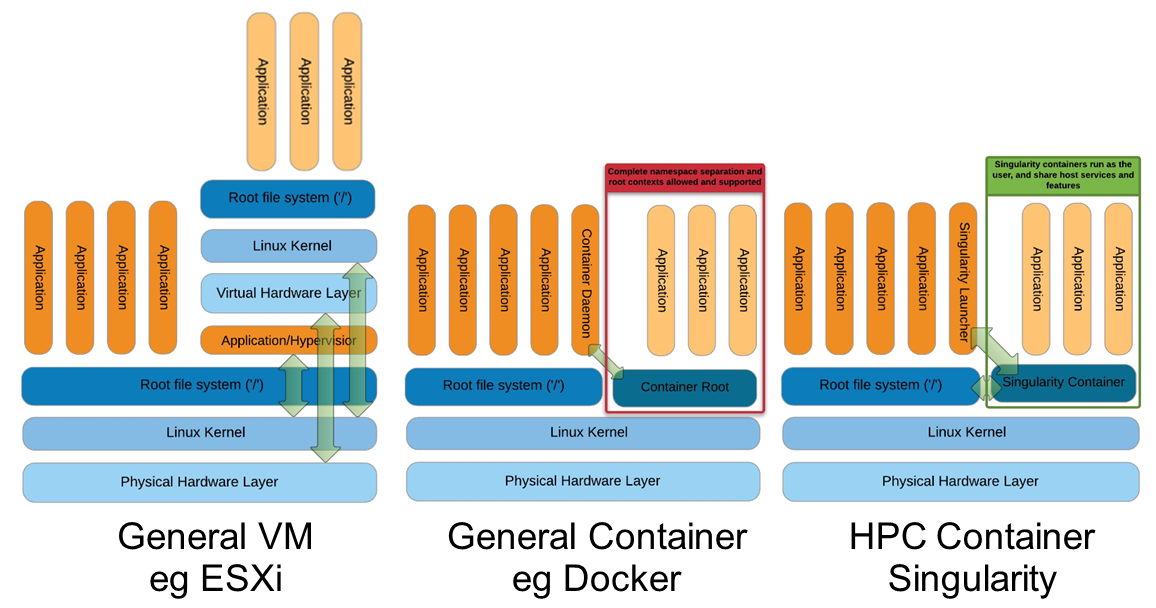
Comparison of three containerization/virtualization approaches: a Virtual Machine (full OS stack with hypervisor), Docker (shared kernel with daemon, layered images, root-owned), and Singularity (shared kernel, no daemon, single image file, user-space execution).
Strengths |
Weaknesses |
|---|---|
No dependency of a daemon |
You cannot use |
Can be run as a simple user |
|
Avoids permission headaches and hacks |
Running Docker native images can take a while first time. Need to convert to Singularity format |
Image/container is a file (or directory) |
|
More easily portable |
|
Two types of images: Read-only (production) and Writable (development, via sandbox — exposes the full image filesystem as a directory) |
Apptainer vs. Singularity
Nowadays, there may be some confusion since there are two projects:
They “forked” in 2021. So far they share most of the codebase, but eventually this could be different, and software might have different functionality.
In the command-line you can have apptainer installed but singularity is available as an alias of the former.
Container registries
Container images, normally different versions of them, are stored in container repositories.
These repositories can be browser or discovered within, normally public, container registries.
Docker hub
It is the first and most popular public container registry (which provides also private repositories).
Example:
https://hub.docker.com/r/biocontainers/fastqc
singularity build fastqc-0.11.9_cv7.sif docker://biocontainers/fastqc:v0.11.9_cv7
Biocontainers
Website gathering Bioinformatics focused container images from different registries.
Originally Docker Hub was used, but now other registries are preferred.
Via quay.io
https://quay.io/repository/biocontainers/fastqc
singularity build fastqc-0.11.9-quay.sif docker://quay.io/biocontainers/fastqc:0.11.9--0
Via a private GitLab registry
singularity remote login --username myusername docker://gitlab.hpc.crg.es:5005
singularity build mycontainer.sif docker://gitlab.hpc.crg.es:5005/myusername/mycontainer:latest
Via Galaxy project prebuilt images
singularity pull fastqc-0.11.9.sif https://depot.galaxyproject.org/singularity/fastqc:0.11.9--0
Galaxy project provides all Bioinformatics software from the BioContainers initiative as Singularity prebuilt images. If download and conversion time of images is an issue, this might be the best option for those working in the biomedical field.
Link: https://depot.galaxyproject.org/singularity/
Difference between singularity pull and singularity build
singularity pulldownloads a pre-built image from a remote source (such as a registry or URL) and saves it locally. It does not build or customize the image; you get the image as-is.Example:
singularity pull fastqc-0.11.9.sif https://depot.galaxyproject.org/singularity/fastqc:0.11.9--0
singularity buildcreates a new image. It allows customization and can build from scratch or from a base image.Example:
singularity build fastqc-0.11.9_cv7.sif docker://biocontainers/fastqc:v0.11.9_cv7
Summary:
Use pull to fetch ready-made images; use build to create or convert images, or to customize them.
From Docker daemon
If you have a Docker daemon running in your machine, you can also build images from there without need to share them in a registry first.
singularity build myubuntu.sif docker-daemon://myubuntu:latest
From a Docker tar archive
If you saved a tar archive from a Docker image, you can also build images from there. This is useful if you might not have a Docker daemon running in the machine you intend to use Singularity. This is common in HPC environments.
# Where you have a Docker daemon running
docker save -o myubuntu.tar myubuntu:latest
# Where you have Singularity
singularity build myubuntu.sif docker-archive://myubuntu.tar
Note
With Podman, that does not have a daemon service, that would be the regular way to convert to Singularity format.
Running and executing containers
Once we have some image files (or directories) ready, we can run processes.
Singularity shell
The straight-forward exploratory approach is equivalent to docker run -ti biocontainers/fastqc:v0.11.9_cv7 /bin/sh but with a more handy syntax.
singularity shell fastqc-0.11.9.sif
Move around the directories and notice how the isolation approach is different in comparison to Docker. You can access most of the host filesystem.
Singularity exec
That is the most common way to execute Singularity (equivalent to docker exec). That would be the normal approach in an HPC environment.
singularity exec fastqc-0.11.9.sif fastqc
a processing of a FASTQ file from data directory:
singularity exec fastqc-0.11.9_cv7.sif fastqc B7_input_s_chr19.fastq.gz
Environment control
By default, Singularity inherits a profile environment (e.g., PATH environment variable). This may be convenient in some circumstances, but it can also lead to unexpected problems when your own environment clashes with the default one from the image.
singularity shell -e fastqc-0.11.9.sif
singularity exec -e fastqc-0.11.9.sif fastqc
Compare env command with and without -e modifier.
singularity exec fastqc-0.11.9.sif env
singularity exec -e fastqc-0.11.9.sif env
Exercise
Using the 2 FASTQ available files, process them using fastqc.
Suggested solution
# Create a dummy directory
mkdir data

# Copy contents FASTQC files in data directory

singularity exec fastqc-0.11.9.sif fastqc data/*fastq.gz
Singularity run
The run subcommand is not used as commonly as exec in Singularity, however we can use it as well. We can reuse the random numbers Docker example.
# We asume we have the image random_numbers in Docker
singularity build random_numbers.sif docker-daemon://random_numbers:latest

# Run it
singularity run random_numbers.sif
# With an argument
singularity run random_numbers.sif 10
# If we try to exec it, it will fail...
singularity exec random_numbers.sif
# We need to provide an executable as an argument
singularity exec random_numbers.sif /random_numbers.bash
See also
Definition files (.def) are the equivalent of Dockerfiles, allowing you to build custom container images from scratch or from existing base images (e.g., Docker ones such as ubuntu:22.04). They support sections like %post for installation commands, %environment for environment variables, and %runscript to define the default command.
The %runscript section defines what executes when you run singularity run mycontainer.sif without specifying a command. This makes containers behave like executable programs, similar to CMD and ENTRYPOINT in Docker.
Bind paths (aka volumes)
There are paths of the host system already mounted in the container
Default ones, no need to mount them explicitly:
`$HOME`,`/sys:/sys`,`/proc:/proc`,`/tmp:/tmp`,`/var/tmp:/var/tmp`,`/etc/resolv.conf:/etc/resolv.conf`,`/etc/passwd:/etc/passwd`, and`$PWD`Ref
For others, need to be done explicitly (syntax: host_path:container_path)
mkdir datatest
touch datatest/testout
singularity shell -e -B ./datatest:/scratch fastqc-0.11.9.sif
> touch /scratch/testin
> exit
ls -l datatest
Tip
Since Singularity mounts $HOME by default and since that directory can have a lot of user configuration files (e.g., in .config or .local), it can lead to unexpected issues (e.g., pre-installed software libraries in user directory). This can be solved using explicit --home <CUSTOMHOME> or even --no-home option.
Tip
To selectively disable one or more default bind paths without affecting the others, use the --no-mount flag. For example, to prevent $HOME and /tmp from being mounted:
singularity exec --no-mount home,tmp fastqc-0.11.9.sif fastqc
This is useful when you want finer-grained control than --no-home.
Singularity tips
Troubleshooting
singularity --help
singularity exec --help
Fakeroot
Singularity permissions are an evolving field. If you don’t have access to sudo, it might be worth considering using --fakeroot / -f parameter.
More details at https://apptainer.org/docs/user/main/fakeroot.html
Singularity/Apptainer cache directory
$HOME/.apptainer
$HOME/.singularity
It stores cached images from registries, instances, etc.
If problems may be a good place to clean. When running
sudo, $HOME is /root.
Warning
There you can find the credentials we stored for the remote registry (in remote.yaml). We can remove it as well.
Global configuration
Normally at /etc/apptainer/apptainer.conf (/etc/singularity/singularity.conf) or similar (e.g., preceded by /usr/local/)
It can only be modified by users with administration permissions
Worth noting
bind pathlines, which point default mounted directories in containers
# BIND PATH: [STRING]
# DEFAULT: Undefined
# Define a list of files/directories that should be made available from within
# the container. The file or directory must exist within the container on
# which to attach to. you can specify a different source and destination
# path (respectively) with a colon; otherwise source and dest are the same.
# NOTE: these are ignored if apptainer is invoked with --contain except
# for /etc/hosts and /etc/localtime. When invoked with --contain and --net,
# /etc/hosts would contain a default generated content for localhost resolution.
#bind path = /etc/apptainer/default-nsswitch.conf:/etc/nsswitch.conf
#bind path = /opt
#bind path = /scratch
bind path = /etc/localtime
bind path = /etc/hosts
# Custom addition below
bind path = /users